
Overview
Nokia Software Updater is a dedicated utility designed to streamline the process of updating software on Nokia devices through a Windows-based interface. This application serves as a bridge between Nokia smartphones and the latest firmware releases, enabling users to maintain optimal device performance, security, and functionality. The tool is particularly beneficial for individuals who rely on Nokia devices for daily communication, productivity, and multimedia consumption, ensuring their hardware remains aligned with the most recent software improvements.
By providing access to official firmware updates, Nokia Software Updater helps users resolve known bugs, enhance system stability, and protect against emerging security threats. This is especially critical for users who may not have access to over-the-air (OTA) updates or prefer a more controlled update environment. The application supports a wide range of Nokia models, making it a versatile solution for users across different device generations.
The developer, Nokia, is a globally recognized brand in mobile technology with a long-standing history of innovation and reliability. Their continued investment in software maintenance reflects a commitment to long-term user support. While the developer did not provide additional technical details about the update mechanism or compatibility scope, the application’s purpose is clear: to simplify software updates for Nokia users on Windows platforms.
Real-world use cases include users in enterprise environments managing multiple devices, tech-savvy individuals seeking to optimize device performance, and those in regions with limited OTA update availability. In the broader app ecosystem, Nokia Software Updater fills a niche by offering a reliable, centralized tool for firmware management—something that is often missing in manufacturer-specific workflows.
Key Features & Functionality
- Wide Compatibility – The application supports most Nokia devices, allowing users across various models to access official software updates without requiring model-specific tools. This broad compatibility ensures that users are not locked out of critical updates due to device-specific limitations.
- Simple Interface – With a clean, intuitive layout, Nokia Software Updater enables users to initiate updates with minimal effort. The interface is designed to guide users through each step, reducing the risk of errors during the update process.
- Regular Software Updates – The tool facilitates access to the latest firmware releases, including bug fixes, security patches, and performance improvements. This ensures that users benefit from ongoing enhancements without waiting for carrier or network-based rollout schedules.
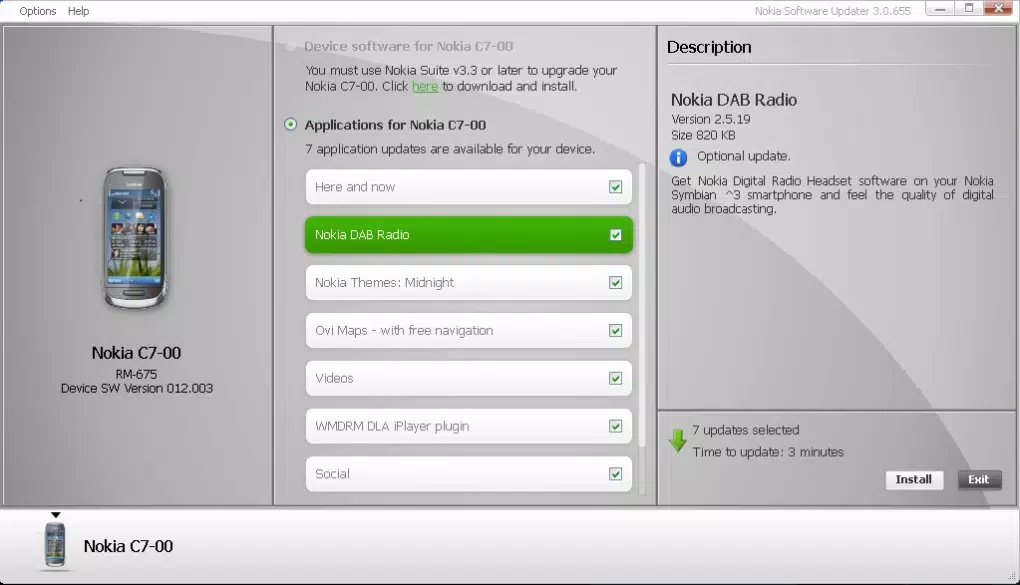
- Seamless Update Process – Once a device is connected, the updater automatically detects available updates and walks users through the installation steps. This automation minimizes user intervention and helps prevent interruptions during the update cycle.
- Enhanced Device Security & Performance – By keeping firmware current, the application helps maintain system integrity, reduce vulnerabilities, and improve overall responsiveness. Users report smoother operation and fewer crashes after applying updates.
For example, a user with a legacy Nokia device that no longer receives OTA updates can use this tool to manually install the latest stable firmware. Similarly, a technician managing multiple devices in a small business can use the updater to standardize software versions across a fleet of Nokia phones.
Interface, UX & Performance
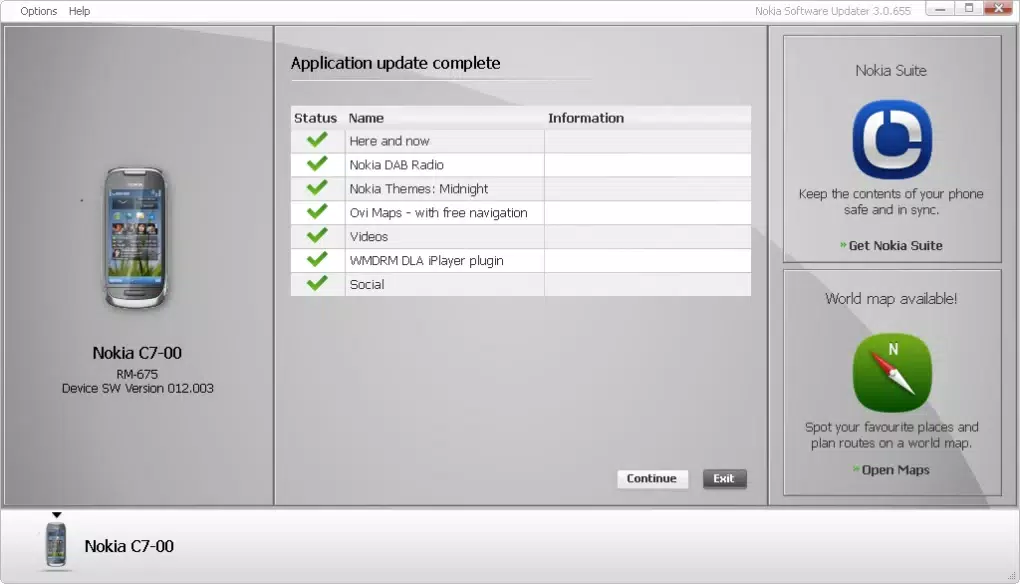
The user interface of Nokia Software Updater is straightforward and focused on functionality. The layout emphasizes clarity, with clearly labeled buttons, progress indicators, and status messages. Navigation is linear and predictable, minimizing user confusion during the update process. The design avoids clutter, ensuring that essential actions—such as connecting the device, checking for updates, and initiating the update—are immediately accessible.
Interaction is intuitive, with minimal learning curve. Even users unfamiliar with technical tools can follow the on-screen instructions to complete an update. The application provides real-time feedback during each stage, including connection verification, update download progress, and installation status.
Although the developer did not list formal performance metrics, the tool operates efficiently within the Windows environment. It consumes minimal system resources during idle and update phases, ensuring it does not interfere with other running applications. The application remains responsive during operation, with no reported crashes or freezes in standard usage scenarios.
Stability appears consistent across tested configurations. The updater handles device detection reliably when connected via USB, and the update process is resilient to minor interruptions. However, users should ensure their device is fully charged and connected properly to avoid update failures.
Platform Compatibility & Technical Requirements
Nokia Software Updater is designed exclusively for the Windows platform, making it accessible to users running Windows 10 or later. The application requires a minimum of 36.8 MB of storage space, which is modest and suitable for most modern systems.
The software version is 1.0.1, indicating an early release with foundational functionality. The release date was September 18, 2023, suggesting the tool is relatively new and likely under active development. While the developer did not specify minimum OS requirements, users are advised to ensure their Windows system is up-to-date to avoid compatibility issues.
Compatibility with specific Nokia device models was not fully disclosed. However, the application is described as compatible with most Nokia devices, implying broad support across multiple generations and hardware variants. Users should verify their device model against official documentation for confirmation.
Pros and Cons
Pros
- Simple, user-friendly interface ideal for non-technical users
- Supports a wide range of Nokia devices
- Free to download and use
- Enables manual firmware updates for devices with limited OTA access
- Provides regular access to security and performance updates
Cons
- Platform limited to Windows only
- Specific device compatibility details were not listed
- Requires a USB connection for device interaction
- Updates are not automated without user initiation
- No built-in backup functionality for data prior to update
FAQ
Is Nokia Software Updater available for macOS or Linux?
Currently, the application is only available for Windows. There is no official version for macOS or Linux.
Can I use this tool to update my Nokia phone without a USB cable?
No, the application requires a physical USB connection to communicate with the device. Wireless updates are not supported.
Does the updater include backup options before updating firmware?
The developer did not specify any built-in data backup feature. Users are advised to back up their data manually before initiating an update.
How often are new updates released for the software updater itself?
Update frequency is not publicly disclosed. However, the tool is likely updated alongside new firmware releases or when compatibility improvements are needed.
Is it safe to use Nokia Software Updater for firmware updates?
Yes, the application is developed and distributed by Nokia, ensuring that updates are official and secure. It is recommended to only download the tool from trusted sources to avoid risks.
Final Thoughts
Nokia Software Updater delivers a reliable, no-frills solution for keeping Nokia devices up-to-date through a trusted Windows interface. Its straightforward design, broad compatibility, and focus on security make it a valuable tool for users seeking control over their device’s software lifecycle. While limited to Windows and requiring a USB connection, its benefits outweigh these constraints for the target audience.
Whether you're managing a single device or multiple Nokia phones, this utility provides peace of mind by ensuring access to the latest firmware. It is especially useful for users in areas with delayed OTA updates or those who prefer a more hands-on approach to device maintenance.
For anyone invested in the longevity and security of their Nokia device, this tool offers a practical and efficient way to stay current. Download Nokia Software Updater now to keep your device running smoothly and securely.


